
Xodo Sign: Features, Pricing, Reviews, and Alternatives

Xodo Sign is a comprehensive electronic signature and document management solution that simplifies the process of signing, sending, and tracking important documents. Designed for individuals, small businesses, and enterprise teams, the platform integrates e-signing with document editing, workflow automation, and team collaboration.
It eliminates the need for printing, scanning, or mailing documents, making signing and approvals faster and more efficient. By providing secure, legally compliant signatures and tracking, Xodo Sign ensures accountability and transparency for every transaction.
What Is Xodo Sign?
Xodo Sign is part of the broader Xodo ecosystem, which includes PDF editing and annotation tools. It allows users to prepare, sign, and manage documents across web browsers and mobile devices. The system is designed to be intuitive, requiring minimal technical knowledge while providing powerful features for professional use.
Each document signed with Xodo Sign is legally binding, and an audit trail is automatically maintained, recording timestamps, signer information, and IP addresses. It is suitable for contracts, agreements, NDAs, and other professional documentation.
Key Features of Xodo Sign
Xodo Sign offers a range of powerful features designed to simplify document signing, improve workflow efficiency, and ensure security for both individuals and teams.
Secure Electronic Signatures
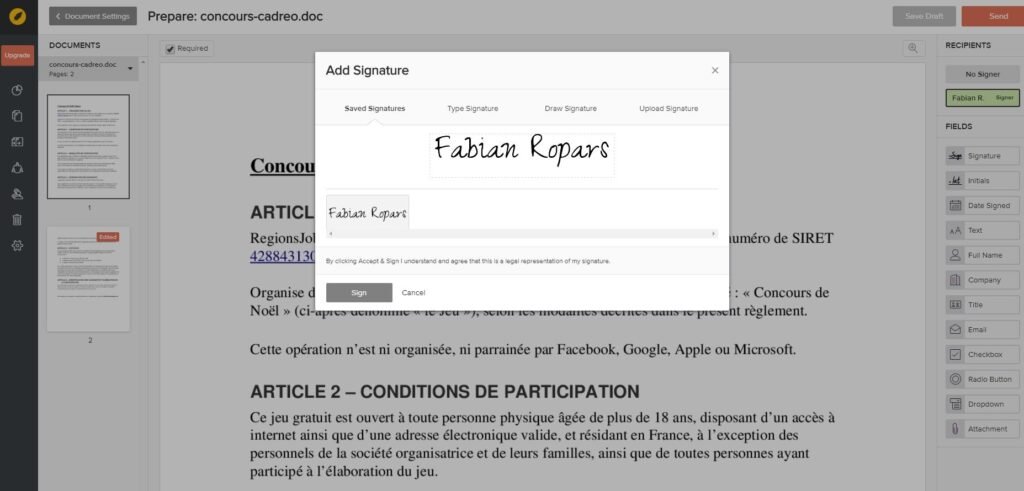
Xodo Sign ensures every signature is secure and legally compliant. The platform records a complete audit trail, including the name, email, time, and IP address of each signer. This traceability protects both the sender and recipient by confirming the authenticity of signatures. In-person signing is also available for situations where face-to-face verification is required.
Document Editing and Preparation
Before sending documents for signing, Xodo Sign provides tools for editing and preparing files. Users can insert signature fields, text boxes, checkboxes, and date fields. The platform allows customization for contracts, agreements, and forms, transforming static documents into interactive, signing-ready files. This feature eliminates the need for separate PDF editors or word processors.
Templates and Reusable Documents
For repetitive processes, Xodo Sign allows users to create reusable templates. Templates can include pre-filled fields, fixed signature positions, and standardized text. This reduces errors, saves time, and ensures consistency across documents. Templates are particularly useful for businesses that handle recurring contracts, client agreements, or employee onboarding paperwork.
Team Collaboration
Xodo Sign supports collaboration across teams, allowing multiple users to view, edit, or approve documents. Access controls and user permissions ensure that sensitive documents remain secure. Team management features make it ideal for small businesses, HR departments, or legal teams that handle multiple approvals and signatures daily.
API Access and Automation
For businesses that want to integrate electronic signing into their existing workflows, Xodo Sign provides API access. Developers can automate document sending, signing, and tracking using the REST API. Integration with Zapier allows no-code automation for common processes, such as sending contracts after a form submission or notifying team members when a document is signed.
Security and Compliance
The platform uses encryption to protect all documents and signatures. Digital certificates and cryptographic signatures ensure that documents cannot be altered after signing. Xodo Sign complies with electronic signature laws and regulations, giving users legal assurance for both personal and business transactions.
Mobile Signing
The Xodo mobile app allows users to sign and send documents from smartphones and tablets. The mobile interface is designed to be simple and responsive, letting users complete transactions on the go. The app also tracks signing status, manages notifications, and provides a dashboard to monitor pending or completed documents.
READ MORE
Pricing and Free Plan
Xodo Sign offers a free plan suitable for individuals or small-scale use. The free plan allows a limited number of document signings per month, making it ideal for casual users. Paid subscriptions provide unlimited signing, access to advanced templates, team collaboration, and API features.
Enterprise plans are available for organizations with higher-volume signing requirements and custom integration needs. The platform aims to provide flexible pricing that accommodates users from freelancers to large businesses.
Advantages of Xodo Sign
One of the main advantages is its seamless integration with Xodo PDF tools, allowing users to edit and sign documents in one platform. The audit trail ensures accountability, while templates and team collaboration streamline workflows. Mobile support and API access make it adaptable for various use cases. Users report that the platform is intuitive, cost-effective, and reliable for regular signing needs.
Limitations
Some limitations include restrictions on the free plan, requiring an internet connection to access and sign documents, and a learning curve for API integration. High-volume users may find enterprise plans costly. While collaboration features are effective, they may not be as advanced as specialized enterprise solutions like DocuSign for very large organizations.
User Feedback
Reviews from users highlight ease of use, affordability, and the combination of signing and PDF editing features. Many users appreciate the mobile functionality and simple interface.
A few have mentioned minor performance issues and limitations of the free plan, but overall, feedback is positive. Users recommend the platform for freelancers, small businesses, and teams that require efficient document management and signing.
Alternatives to Xodo Sign
For those seeking alternatives, several platforms are worth considering:
- DocuSign: Highly established platform with advanced workflow automation and enterprise-level features.
- HelloSign (Dropbox Sign): User-friendly platform integrated with popular cloud storage services.
- SignNow: Affordable and suitable for teams needing templates and multi-user collaboration.
Each alternative has unique strengths depending on volume, workflow complexity, and integration needs.
READ MORE
Ideal Use Cases
Xodo Sign is ideal for small businesses managing contracts, client agreements, and HR documents. Freelancers and consultants can use it for NDAs, quotes, and proposals. Remote teams benefit from real-time collaboration and approval tracking. Developers and startups can integrate signing workflows into applications using API access.
Conclusion
Xodo Sign is a comprehensive e-signature and document management tool designed to improve efficiency, security, and workflow automation. With features like secure electronic signatures, reusable templates, team collaboration, mobile access, and API integration, it serves a wide range of users.
The free plan and flexible paid options make it accessible for individuals and businesses alike. By combining document editing, signing, and tracking in one platform, Xodo Sign helps users save time, maintain compliance, and simplify document workflows.